
✨ Early Bird 40% off your first 3 months with code · 40% off · 3 months · EARLYBIRD
Task list · Professional cleaning

Work sheets for professional cleaning, PIN-signed by site and zone

Digital checklist by location and shift. Quality control per zone. Consumables restocking and incidents recorded. No paper or apps to install. Each work sheet is signed, dated and with photo.

No app to install Free plan forever Signed and dated work sheets

€14,575 M

Revenue of professional cleaning in Spain in 2024

DBK Informa · Sector Observatory (Cleaning Companies, Iberian market, 2025)

+654,000

Workers in the cleaning sector in Spain

DBK Informa · Sector Observatory (2024)

17,750

Building and premises cleaning companies in Spain

ASPEL · Cleaning Sector Data Yearbook 2024

1.07%

Of national GDP represented by cleaning

ASPEL · Cleaning Sector Data Yearbook 2024

Example List

The tasks a cleaning team repeats each shift

A real day in blocks; the foundation of your lists and the workflow you automate with Timlup.

Service start and PPE

07:30–08:00
  1. 1 Collect keys and sign in at the site 4 min
  2. 2 PPE: gloves, footwear, mark wet floor 4 min
  3. 3 Prepare trolley, chemicals and colour-coded cloths 5 min
  4. 4 Review the day's work sheet and assigned zones 3 min

Restrooms and wet areas

08:00–09:00
  1. 1 Disinfect toilets, sinks and taps 15 min
  2. 2 Mop floors and skirting boards in restrooms 10 min
  3. 3 Restock toilet paper, soap and towels 6 min
  4. 4 Empty bins and change liners 5 min

Offices and common areas

09:00–11:00
  1. 1 Empty bins and clean desk surfaces 20 min
  2. 2 Vacuum and mop floors in offices and corridors 25 min
  3. 3 Dust furniture and disinfect door handles 12 min

Glass and restocking

11:00–12:00
  1. 1 Clean windows, partitions and entrance doors 18 min
  2. 2 Restock consumables in the kitchenette and dispensers 8 min
  3. 3 Log incidents and materials to order 5 min

Quality control and closing the work sheet

end of service
  1. 1 Final zone inspection with photos 10 min
  2. 2 Collect trolley and lock away products 6 min
  3. 3 Sign the work sheet for the site with PIN 3 min
The change

From paper work sheet to control of each location from your mobile

Timlup digitises the work sheets for each location and distributes tasks to the cleaning team via mobile. Everything is recorded without loose sheets.

Without Timlup
  • Paper work sheets that get lost

    Handwritten work sheets get misplaced or wet. There is no real traceability of what was cleaned each day or a way to check if the plan was followed.

  • No proof of which zone was cleaned

    You cannot know if each office or restroom was done well without going in person. Clients complain because there is no real quality control by location.

  • Consumables run out and incidents unrecorded

    Toilet paper or bags run out mid-shift. Incidents are communicated by phone or not at all, and no one logs them.

From paper records to the Timlup app, signed with a PIN
With Timlup
  • PIN-signed work sheet by location

    Each cleaner accesses the task list for that location with their PIN and signs upon completion. The work sheet is sealed with date, time and responsible person.

  • Quality control by zone with photos

    Assign review tasks to each zone. The supervisor can request a photo as evidence that the floor or glass is clean.

  • Incidents and restocking tracked

    If soap is missing or there is a leak, the cleaner marks it on the work sheet. You see in the dashboard exactly when it was reported, what was requested and who replenished it.

For the cleaning team

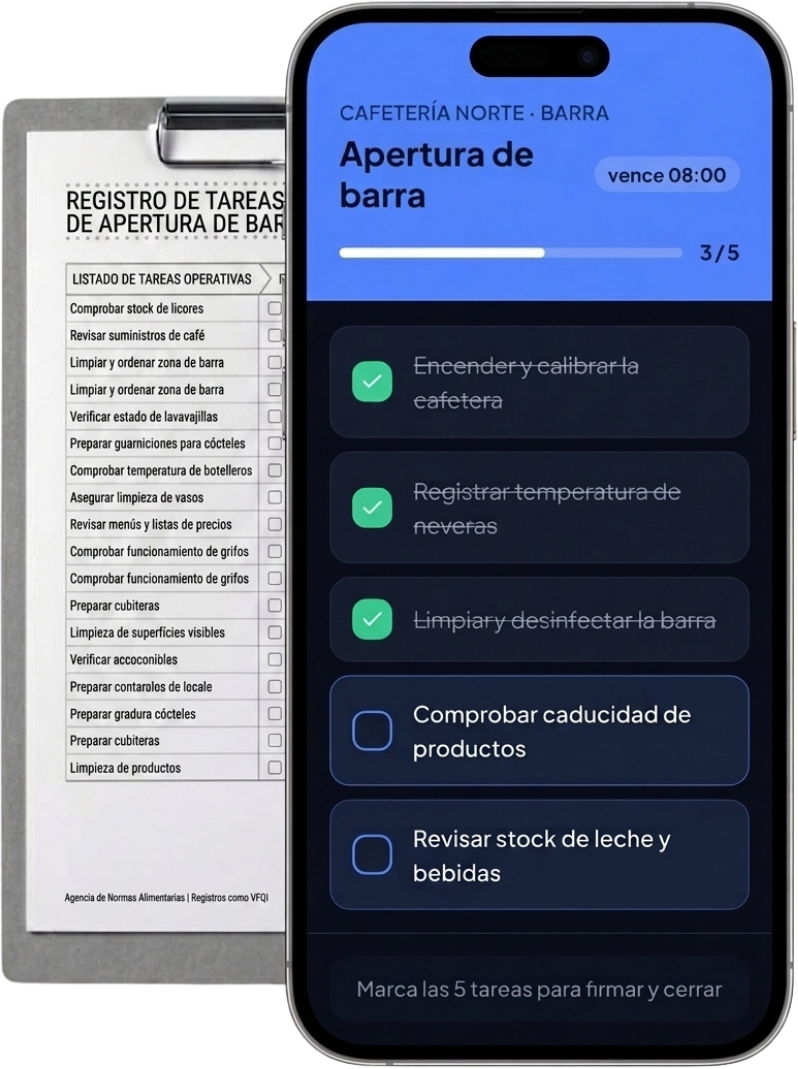
This simple on their mobile

The cleaner logs in with a PIN, sees only their tasks for the shift at that location and signs to close the work sheet. You control everything from the panel.

Oficinas Centro · Planta 2

Service start

due 08:00
3 / 5
  • Pick up cart and PPE
  • Clean and disinfect restrooms
  • Empty bins and clean offices
  • Windows and common areas
  • Restock paper, soap and bags
Mark all 5 tasks to sign and close the work sheet
Features

Everything your cleaning company needs, paperless

Designed for teams that rotate between sites, with quality control and constant restocking.

Work sheets by site

Each client or building has its own customised checklist. The cleaner sees only their shift's tasks and signs with a PIN upon completion.

Signed quality control

The supervisor inspects each zone with photos and a digital signature. You have proof for the client that the service was performed as agreed.

Cleaner PIN access

Each worker accesses their work sheet with a unique PIN. No username or password needed, just their phone and personal code.

Recurring tasks and restocking

Set the frequency of each task: daily, weekly or monthly. Consumables like paper, soap and liners are logged automatically.

One site per client or building

Manage multiple sites from a single panel. Each has its own task template and history of signed work sheets.

On the team's mobile, no install

Works on any smartphone with internet connection. No download or setup required, just open the link and sign.

At the site

A cleaning team's daily routine, in pictures

From service start to closing the work sheet, each task signed from the tablet.

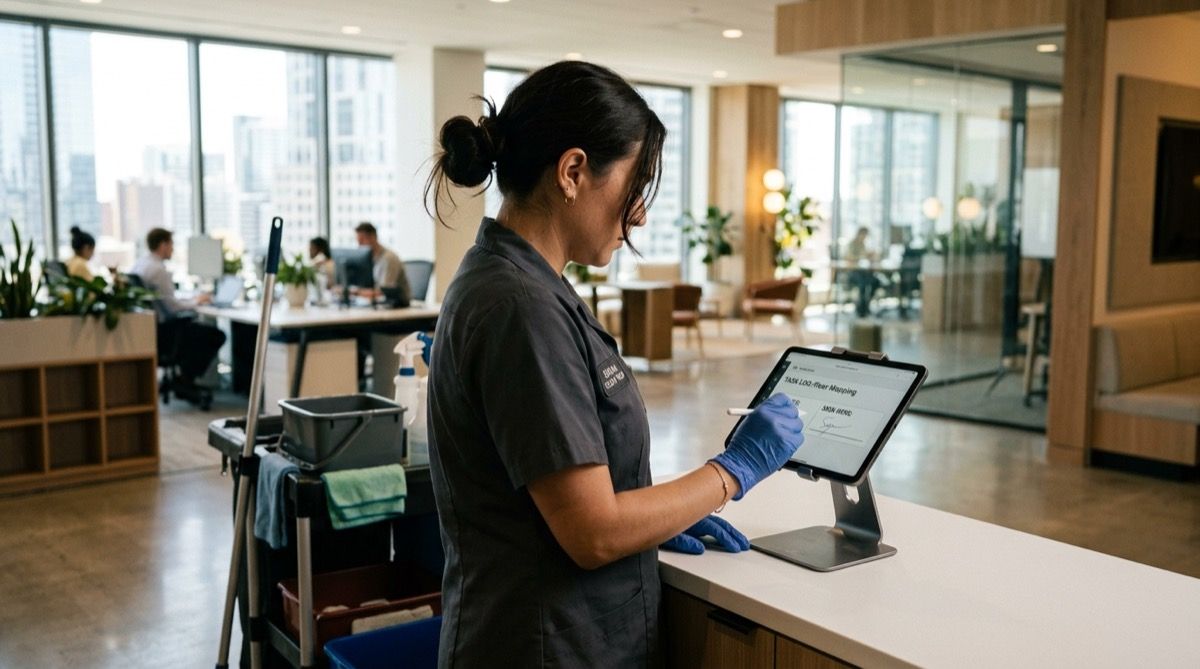
Professional cleaner in uniform and gloves cleaning an office while signing the task on a task tablet.
Each cleaned zone is marked and signed with PIN, no paper work sheets.
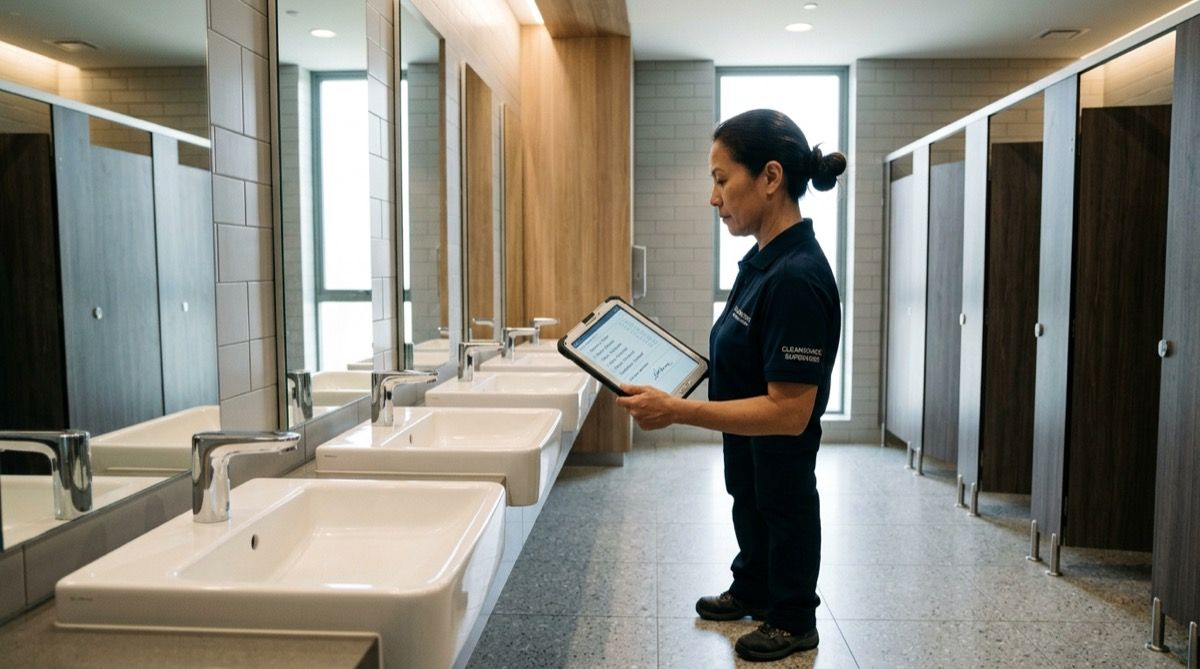
Supervisor doing quality control of a restroom with a task tablet in hand.
Zone quality control is recorded with photos and the supervisor's signature.
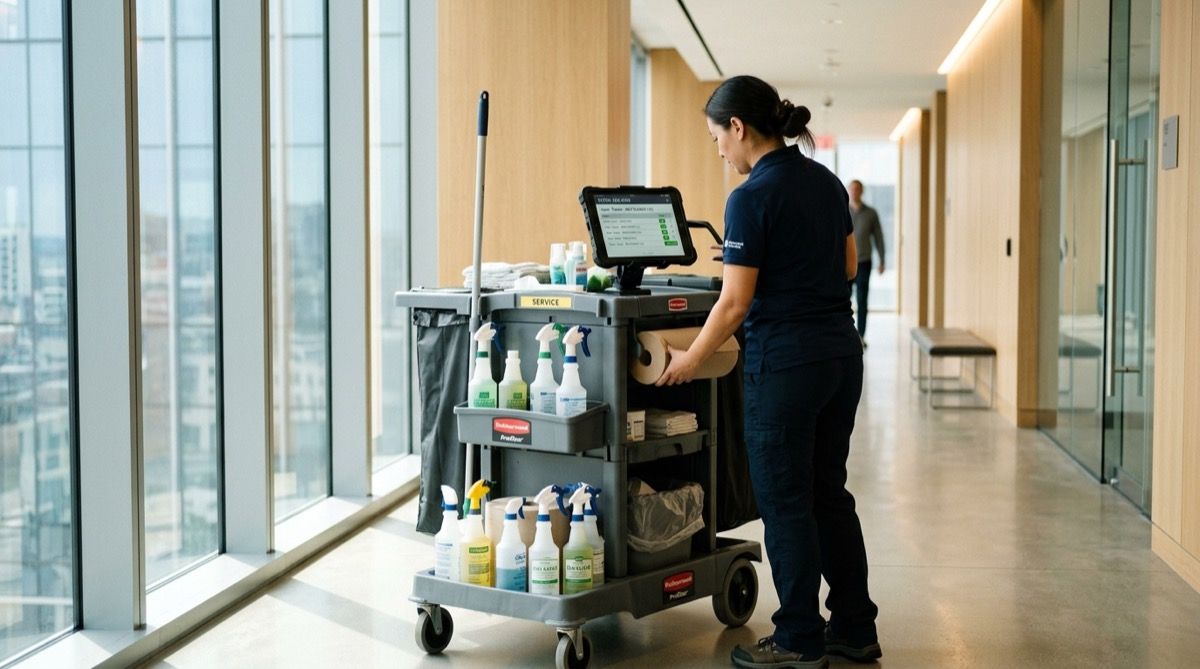
Cleaning trolley with products while an operator restocks consumables and logs it on a task tablet.
Restocking of paper, soap and liners is recorded per shift and site.
How it works

Your cleaning service digitised in an afternoon

No installations or training; it works on the team's mobile or a tablet at the site.

1

Create your work sheets and lists per site

From the panel, design a cleaning checklist for each client or building. Assign tasks by shift and zone, and define quality control checkpoints. All ready in minutes, without touching a line of code.

2

The team completes them per shift

Each operator accesses their work sheet from their mobile or the site tablet. They mark completed tasks, add photos if needed, and sign with their personal PIN. The work sheet is closed and sealed, no paper or confusion.

3

You review each site from the panel

The control panel shows a traffic light status for each zone: green if everything is correct, red if there is an incident or a missed round. You can view the history of each work sheet and download it as proof, without having to travel.

What they say

Cleaning companies that left paper behind

Teams that rotate between sites with the same need: that every cleaned zone and quality control is recorded.

Carlos

Carlos

Manager · Cleaning company (Madrid)

“We used to waste hours reviewing paper work sheets. Now each operator signs with their PIN when finishing the round. From the panel I instantly see which zones are done and which aren't. No more arguments with clients.”


Javier

Javier

Team leader · Community cleaning (Valencia)

“We have several residential communities and each building is different. With Timlup we create a common template and each team adapts it to their route. PIN signing gives us peace of mind that every task has been done.”

Laura

Laura

Supervisor · Centre and warehouse cleaning (Bilbao)

“Consumables restocking was chaos. Now each operator logs how much paper, soap and liners they restock each shift. From the panel I know when to order more stock. We've saved a lot.”

Carlos

Carlos

Manager · Cleaning company (Madrid)

“We used to waste hours reviewing paper work sheets. Now each operator signs with their PIN when finishing the round. From the panel I instantly see which zones are done and which aren't. No more arguments with clients.”

Javier

Javier

Team leader · Community cleaning (Valencia)

“We have several residential communities and each building is different. With Timlup we create a common template and each team adapts it to their route. PIN signing gives us peace of mind that every task has been done.”

Laura

Laura

Supervisor · Centre and warehouse cleaning (Bilbao)

“Consumables restocking was chaos. Now each operator logs how much paper, soap and liners they restock each shift. From the panel I know when to order more stock. We've saved a lot.”

Carlos

Carlos

Manager · Cleaning company (Madrid)

“We used to waste hours reviewing paper work sheets. Now each operator signs with their PIN when finishing the round. From the panel I instantly see which zones are done and which aren't. No more arguments with clients.”

Javier

Javier

Team leader · Community cleaning (Valencia)

“We have several residential communities and each building is different. With Timlup we create a common template and each team adapts it to their route. PIN signing gives us peace of mind that every task has been done.”

Laura

Laura

Supervisor · Centre and warehouse cleaning (Bilbao)

“Consumables restocking was chaos. Now each operator logs how much paper, soap and liners they restock each shift. From the panel I know when to order more stock. We've saved a lot.”

María

María

Team supervisor · Office cleaning (Barcelona)

“Quality control was a headache. Now I do zone inspections with photos from the tablet. If something isn't right, I flag it and the team corrects it immediately. Everything is recorded and signed.”

Antonio

Antonio

Quality manager · Retail premises cleaning (Sevilla)

“A client claimed a cleaning hadn't been done. We showed them the signed work sheet with a photo of the zone. The problem was solved. Now we use Timlup in all premises.”

Pedro

Pedro

Administrator · Cleaning company (Málaga)

“Signed and dated work sheets are the best proof of our work. With Timlup, each service is recorded immutably. No more arguments with clients or the team.”

María

María

Team supervisor · Office cleaning (Barcelona)

“Quality control was a headache. Now I do zone inspections with photos from the tablet. If something isn't right, I flag it and the team corrects it immediately. Everything is recorded and signed.”

Antonio

Antonio

Quality manager · Retail premises cleaning (Sevilla)

“A client claimed a cleaning hadn't been done. We showed them the signed work sheet with a photo of the zone. The problem was solved. Now we use Timlup in all premises.”

Pedro

Pedro

Administrator · Cleaning company (Málaga)

“Signed and dated work sheets are the best proof of our work. With Timlup, each service is recorded immutably. No more arguments with clients or the team.”

María

María

Team supervisor · Office cleaning (Barcelona)

“Quality control was a headache. Now I do zone inspections with photos from the tablet. If something isn't right, I flag it and the team corrects it immediately. Everything is recorded and signed.”

Antonio

Antonio

Quality manager · Retail premises cleaning (Sevilla)

“A client claimed a cleaning hadn't been done. We showed them the signed work sheet with a photo of the zone. The problem was solved. Now we use Timlup in all premises.”

Pedro

Pedro

Administrator · Cleaning company (Málaga)

“Signed and dated work sheets are the best proof of our work. With Timlup, each service is recorded immutably. No more arguments with clients or the team.”

FAQ

Frequently asked questions from cleaning companies and supervisors

The most common doubts when adopting Timlup in cleaning companies.

What type of cleaning companies is Timlup for?
Timlup is designed for professional cleaning companies that work in offices, residential communities, retail premises, educational centres or industrial warehouses. It works for both self-employed workers and teams managing multiple sites. It is not HR or time-tracking software; it is the digital and signed record of work sheets and zone quality controls.
How do signed work sheets per site work?
You create a task checklist for each site and shift. The operator accesses from their mobile or a tablet, marks completed tasks, adds photos if needed, and signs with their personal PIN. The work sheet is closed with date and time, and the history is unalterable. It serves as irrefutable proof for the client.
How do I control quality of each zone without being there?
The supervisor can perform zone inspections from their mobile. They assign a control round, the operator receives the notification and carries out the checks, taking photos if necessary. The panel shows a traffic light status for each zone and detects if any round has been missed.
Can I log incidents and consumables restocking?
Yes. The operator can report incidents with photo and description, and the responsible person receives an alert. You can also include restocking of paper, soap and liners in the checklist, logging the quantities replenished each shift. Everything is linked to the work sheet.
Does it work for multiple sites or clients at once?
Yes. Each client or building is set up as an independent site. You can create common checklist templates and assign them to multiple sites. The unified panel lets you see the status of all of them. The Pro plan is designed for teams with multiple sites.
Do I need to install an app or buy tablets?
No. Timlup works 100% in the browser on a mobile, tablet or computer. Nothing to install. You can reuse the team's mobiles or leave a tablet at each site. Setup is immediate.
How long does it take to get started?
You can have it ready in an afternoon. We provide an example cleaning template that you can adapt to your services. No heavy training needed; your operators will learn to use PIN signing in five minutes.
John Guerrero
Editor

John Guerrero

Founder of Timlup · Founder of ChefBusiness

15+ years working on business operations and process digitisation. Behind Timlup, ChefBusiness and AI Chef Pro. These guides capture the daily-control procedures I see working in operations-heavy businesses across Spain.

Deep dive

The lists for your cleaning service, zone by zone

Each zone and work sheet has its steps and controls; these are the guides we are publishing so you can digitise your operations.

Service start · soon

PPE, cart, chemicals and sign-in at the assigned location.

Restrooms and wet areas · soon

Disinfection of restrooms, showers, restocking of paper and soap.

Offices · soon

Bins, surfaces, floors and vacuuming of offices and meeting rooms.

Quality control · soon

Zone inspection with photos and supervisor signature.

Consumables restocking · soon

Paper, soap, bags and record of what was restocked.

Start with your cleaning company today

No card required. Free plan forever.