
Martin Briggs
Owner · Fashion shop (Manchester)
“We used to rely on a grubby ring-binder for the morning checks. Now my supervisor signs off the window, lights and alarm from the shop tablet, and I can see it from home in seconds. No more guessing.”
A digital checklist for your shop: opening, shelf restocking, window display and fitting rooms, service and till, stockroom and closing with cash-up. No paper, no apps to install: every task signed, dated and at hand.
No app to install Free plan, forever Signed, dated records
543,000+
Retail premises in Spain
INE · DIRCE / Domestic trade
428,000+
Retail businesses (high-street shops)
INE · DIRCE
+4.1%
Retail sales growth in 2025
INE · Retail Trade Index
−40 min
Saved per day vs a paper notebook
Internal measurement with pilot shops
A real day, split by area. What you see below is the basis of your lists — and the exact flow you automate with Timlup.
Trade the dog-eared notebook behind the till for a live checklist you control from your mobile, wherever your shop is.
The paper chase
Opening procedures scribbled on a notepad, lost under the till, with no way to confirm the window display was actually checked.
Invisible afternoons
You'd phone the shop to ask if restocking was done, only to hear 'I think so' — never a definitive, time-stamped answer.
Closing roulette
Cash-up sheets filled in differently by each team member; alarms and lights left to memory, with zero proof the final walk-round happened.
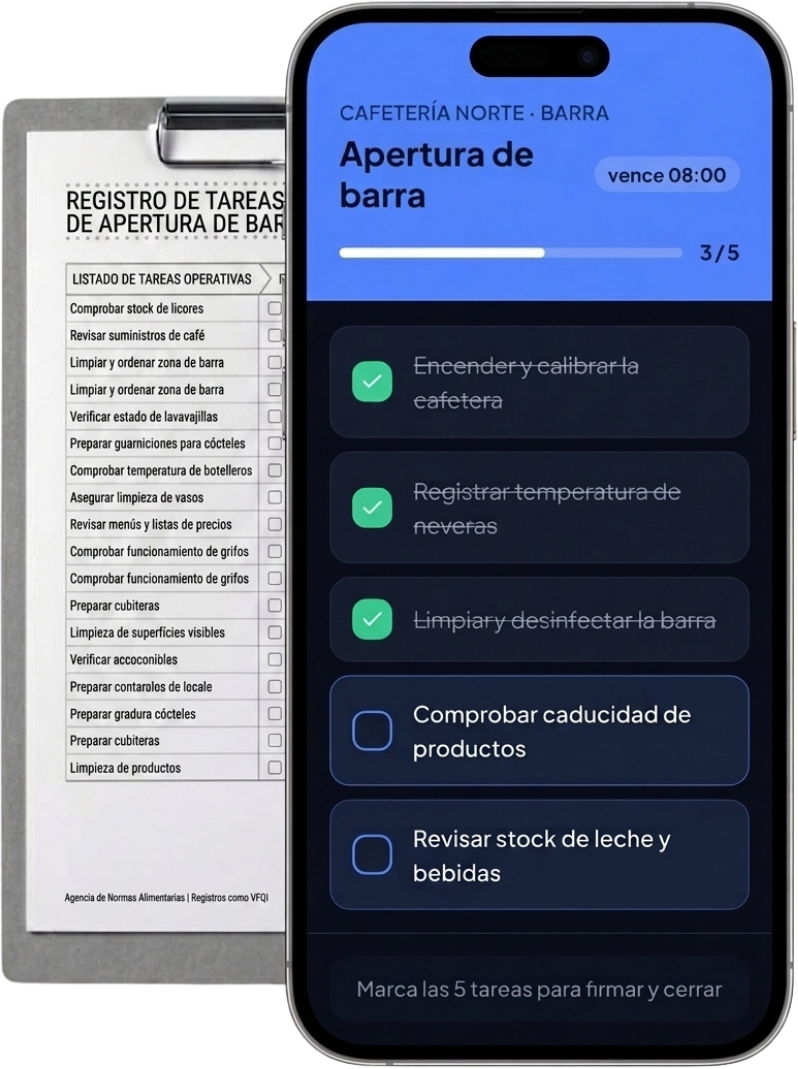
One tap, one protocol
Every open and close follows the same digital list, signed with a PIN — so you see the window, alarm and till checks completed before the door unlocks.
Live restocking radar
Shelf replenishment and price-label tasks ticked off in real time, so you know the gondola-ends are filled without a single phone call.
Signed and sealed
Cash-up and security routines are logged with a PIN signature, giving you a tidy, exportable record that silences the 'who did what?' chaos.
No training, no installs. The team signs in with a PIN, sees only their tasks for the shift and signs off at the end. You control it all from your dashboard.
Centre Shop · Floor
Built for the rhythm of a shop with a rotating team, daily restocking and a cash-up at close.
Lights, window display, alarm, till and cash-up step by step. The team skips nothing and the shop opens and closes the same way every time.
Cash-ups, alarms and incidents are signed, with time and team member. If a discrepancy arises, you know who, when and how.
Each person signs in with 4 digits on the counter tablet. No accounts or passwords to forget between shifts.
Restocking, cleaning and window display at the frequency you set: daily, weekly or per campaign. No verbal reminders.
Floor, stockroom and till each with their own list. Reuse common protocols across the chain or tailor each shop.
It runs in the browser, nothing to install. Reuse the POS tablet or the team's phone: all you need is a connection.
From opening to closing cash-up: every task signed from the tablet.



No installs, no training. It works on any counter tablet or team member's phone.
Opening, floor restocking, till and closing. Define the tasks, their area and who does them. An afternoon of setup.
Each person sees only their active lists, ticks off tasks and signs with a PIN. No paper, no verbal reminders.
A daily summary with a traffic light: what was done, what's outstanding, who signed the cash-up. No trip to the shop.
Small teams, rotating shifts, the same problem: paper gets lost and no one remembers who did what.
Martin Briggs
Owner · Fashion shop (Manchester)
“We used to rely on a grubby ring-binder for the morning checks. Now my supervisor signs off the window, lights and alarm from the shop tablet, and I can see it from home in seconds. No more guessing.”

Priya Kapoor
Manager · Gift & stationery shop (Bristol)
“Getting six part-timers to follow the same closing routine was chaos. Timlup gives everyone a clear, step-by-step list — cash-up, stockroom lights, alarm — all PIN-signed, so I know it's actually done.”

James Aldridge
Operations lead · Opticians chain (Leeds, 12 shops)
“Before, I'd spend days travelling just to check opening routines were consistent. Now I pull up the dashboard and see every shop's morning compliance at a glance. It's saved me hundreds of pounds in fuel and hours on the road.”
Martin Briggs
Owner · Fashion shop (Manchester)
“We used to rely on a grubby ring-binder for the morning checks. Now my supervisor signs off the window, lights and alarm from the shop tablet, and I can see it from home in seconds. No more guessing.”
Priya Kapoor
Manager · Gift & stationery shop (Bristol)
“Getting six part-timers to follow the same closing routine was chaos. Timlup gives everyone a clear, step-by-step list — cash-up, stockroom lights, alarm — all PIN-signed, so I know it's actually done.”
James Aldridge
Operations lead · Opticians chain (Leeds, 12 shops)
“Before, I'd spend days travelling just to check opening routines were consistent. Now I pull up the dashboard and see every shop's morning compliance at a glance. It's saved me hundreds of pounds in fuel and hours on the road.”
Martin Briggs
Owner · Fashion shop (Manchester)
“We used to rely on a grubby ring-binder for the morning checks. Now my supervisor signs off the window, lights and alarm from the shop tablet, and I can see it from home in seconds. No more guessing.”
Priya Kapoor
Manager · Gift & stationery shop (Bristol)
“Getting six part-timers to follow the same closing routine was chaos. Timlup gives everyone a clear, step-by-step list — cash-up, stockroom lights, alarm — all PIN-signed, so I know it's actually done.”
James Aldridge
Operations lead · Opticians chain (Leeds, 12 shops)
“Before, I'd spend days travelling just to check opening routines were consistent. Now I pull up the dashboard and see every shop's morning compliance at a glance. It's saved me hundreds of pounds in fuel and hours on the road.”
The questions we hear most when shops adopt Timlup in retail.

John Guerrero
Founder of Timlup · Founder of ChefBusiness
15+ years working on business operations and process digitisation. Behind Timlup, ChefBusiness and AI Chef Pro. These guides capture the daily-control procedures I see working in operations-heavy businesses across Spain.
Every shop routine has its own steps and controls. These are the specific guides we are publishing.
Alarm, window, till float and floor restock, step by step.
Cashing up, card machine close, security and alarm, signed with a PIN.
Shelf replenishment, facing, price labelling and impulse zone.
Shop-floor and stockroom counts, variance reconciliation and shrinkage.
Window and visual, size restocking, fitting rooms and loss prevention: your clothing store's day, signed.
Same approach, copy adapted to each business.
No sign-up, no payment: use them even if you never buy Timlup.
No card. Free plan, forever.
Already on Timlup? Open the retail & shops templates in your dashboard →
Waking the assistant…